How to Reduce No-Shows Without Manually Reminding Every Patient
Three practical strategies for reducing no-shows: automated reminders, immediate plan delivery, and booking confirmation through a WhatsApp link.
In this article
Every week, there are empty appointment slots that could have been full. One patient didn't reply to your message, another forgot the appointment, a third cancelled two hours before. If you see twenty patients a week and three don't show up, that's 15% of your revenue gone — not counting the time you spent preparing and waiting.
The problem isn't that you're unprofessional. The problem is that you're managing everything manually: reminders on WhatsApp, appointment confirmations, delivering the meal plan two days after the session when you finally find time to write it up. No-shows aren't just a behavior problem — they're a systems problem.
Here are three practical strategies you can implement today to reduce no-shows and protect your time and income.
- Automated WhatsApp reminders 24 hours and 2 hours before each appointment catch patients before they double-book their day.
- Delivering the meal plan within 2 hours of the session — not days later — makes the visit feel complete and reinforces commitment.
- A one-tap WhatsApp confirmation link, not just a text message, turns a vague "okay" into a trackable, active commitment.
- None of this requires being stricter with patients — it requires a system that reminds and confirms automatically.
1. Automated WhatsApp Reminders (24 Hours + 2 Hours Before)
Patients don't forget because they don't care — they forget because their lives are busy. A single message the day before can get lost among dozens of other messages.
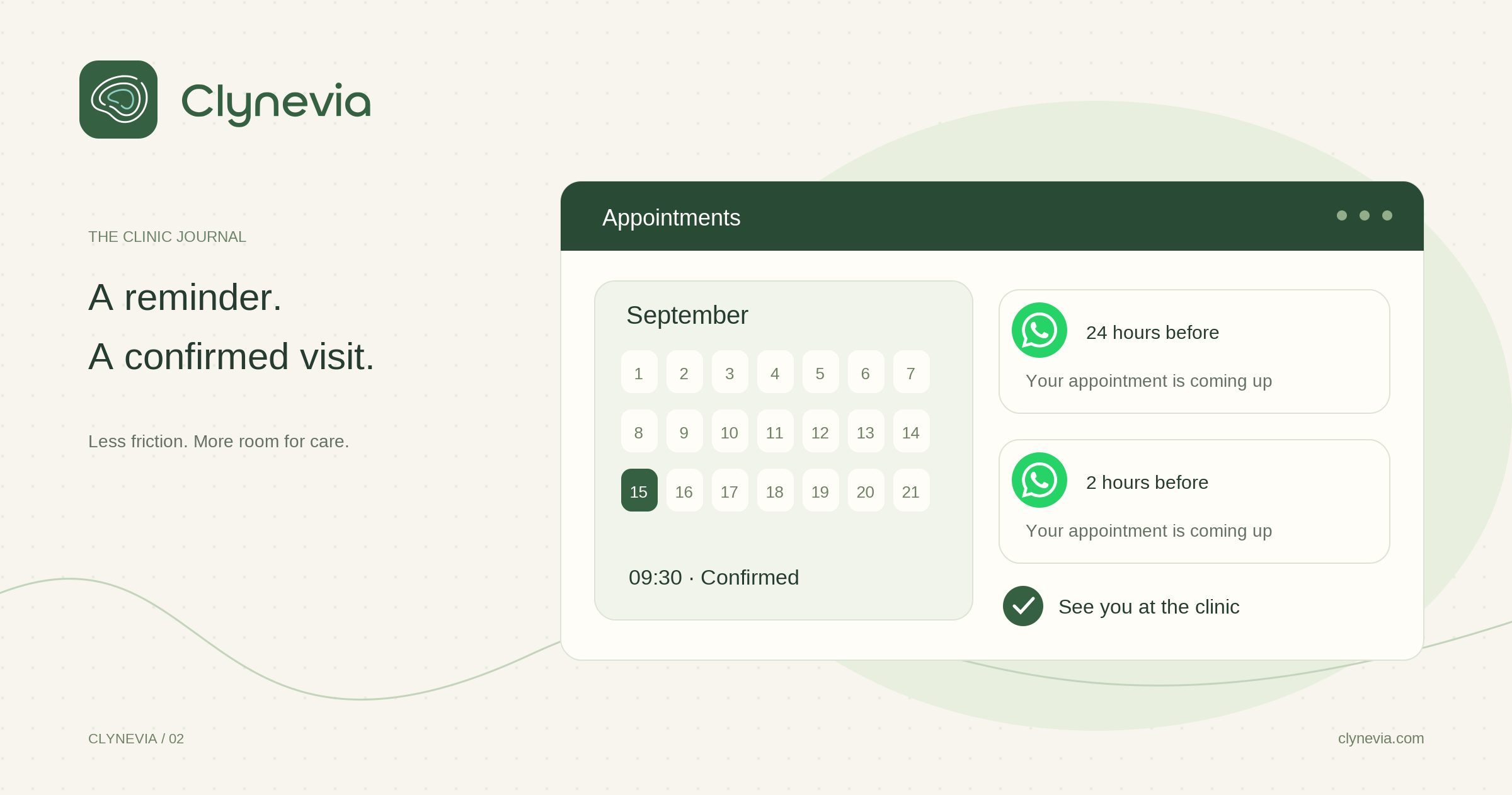
Two automated messages — one 24 hours before ("Your appointment tomorrow at 3pm with Dr. Sarah"), and one two hours before ("Your appointment today in two hours"). That second message catches the patient before they commit to something else.
The double reminder leverages Commitment & Consistency — when the patient sees the first message and decides to attend, the second message reinforces that decision. The automated message arrives at the right moment — before the patient plans their day (24 hours) and before it's too late (2 hours).
Scheduled WhatsApp reminders are planned for Clynevia and are not currently available. For now, set calendar alerts and have your team send reminders through your connected clinic channel. Agree on who checks the schedule and sends each message.
2. Make the Patient Feel Invested: Deliver the Plan Immediately
When you tell the patient "I'll send you the plan in two days," they leave the session empty-handed. The session becomes a conversation, not a tangible service. And when the plan is delayed, the patient starts to doubt: does the specialist really have me in mind?
Deliver the plan before the patient leaves the clinic — or at least within two hours of the session. When the patient holds the plan in their hand (or receives it on WhatsApp while still on their way home), the session becomes real. They paid, they talked, they received. They invested.
This is the Investment principle — when the patient receives something tangible immediately, they feel they've put effort and time into the relationship, and it becomes harder to cancel the next appointment. Immediate delivery also builds trust — it shows you're organized and professional, not too busy to remember.
In Clynevia, you can build the plan in the editor, review an AI draft where that feature is enabled, then print or share a private link after checking it. The specialist decides what to approve and when to send it.
3. Booking Confirmation via WhatsApp Link (Not Just a Message)
When you send "Your appointment is Wednesday at 3pm, okay?", the patient replies "okay" and forgets. There's nothing to remind them, and no clear commitment.
Instead of a regular message, send a confirmation link — the patient clicks "Confirm Attendance" or "Request Reschedule". That click — even though it's simple — makes a big psychological difference.
The principle of Active Commitment — when the patient takes an action (clicks a button), not just reads a message, the commitment becomes stronger. The link also gives you data — you know who confirmed and who didn't, and you can follow up with those who didn't.
Clynevia records appointment requests for the specialist to confirm. Booking can happen through the public page, connected messaging or an enabled assistant integration. Automated reminder and confirmation follow-up campaigns are planned; the current booking workflow does not promise those scheduled messages.
The Bottom Line: No-Shows Aren't Fate, They're the Result of a System
Patients don't miss appointments because they don't care. They miss them because they forget, or because they didn't feel enough commitment, or because there were no clear consequences. The good news: all of these causes can be addressed with a better system.
Automated reminders solve forgetting. Immediate plan delivery makes the patient feel invested. And active confirmation builds real commitment.
You don't need to become harsher — you need to become clearer and more organized. Clynevia brings appointment requests, patient records, plan sharing and connected conversations into one Arabic-first workspace. Scheduled reminders remain planned; until they are available, assign the reminder task explicitly within your team.
Every practice is different — try these strategies and see what works for you. But start with at least one this week. Your time and income are worth it.
FAQ
01How many reminders should I send before an appointment?+
Two tends to work well — one about 24 hours before, so the patient can plan their day around it, and one about 2 hours before, to catch them before they commit to something else.
02Does sending the plan faster actually reduce no-shows?+
It addresses a related but different problem. When patients receive their plan quickly, the session feels complete and tangible, which reinforces their commitment to the next visit. It won't fix every no-show on its own, but paired with reminders it closes a real gap.
03Is a confirmation link better than just texting to confirm?+
A link that requires an action — tapping "Confirm" or "Request Reschedule" — creates a stronger, more trackable commitment than a message the patient can read and forget. It also tells you exactly who to follow up with.
04Can I reduce no-shows without special software?+
Yes, manually: set calendar reminders for every appointment and send confirmation messages yourself. It works, but it depends on you remembering every time, for every patient, every week. Automation is the difference between a one-time fix and something that holds up when your week gets busy.
05Will these strategies work for every practice?+
Every practice is different. Some patients respond better to different reminder timing or channels. Treat these as a starting point and adjust based on what you actually see in your own booking pattern.